More accurate sentiment, smarter conversations, and built-in product guidance
Version 4.15.0 — 6th July 2026
This release makes your feedback analysis more accurate where it matters most. Sentiment is now measured at the opinion level — not the response level. And Ask Feedier gets two meaningful upgrades: it can now summarize your conversations and answer your product questions on the spot.
For CX teams, this means cleaner analysis, faster reporting, and less friction in daily workflows.
The daily challenge of analyzing complex feedback
CX teams deal with mixed, nuanced feedback every day. A customer who loves your product but criticizes your delivery generates a "neutral" sentiment score in most tools — masking both the praise and the frustration, and leaving you without actionable signal.
On top of that, every analysis session often starts from scratch. You lose context between sessions, search for documentation in another tab, and manually copy conclusions into reports.
These aren't minor inconveniences. They slow down insight cycles and reduce the value of the data you've already collected.
What's New in This Release
Sentiment That Actually Reflects Your Customers
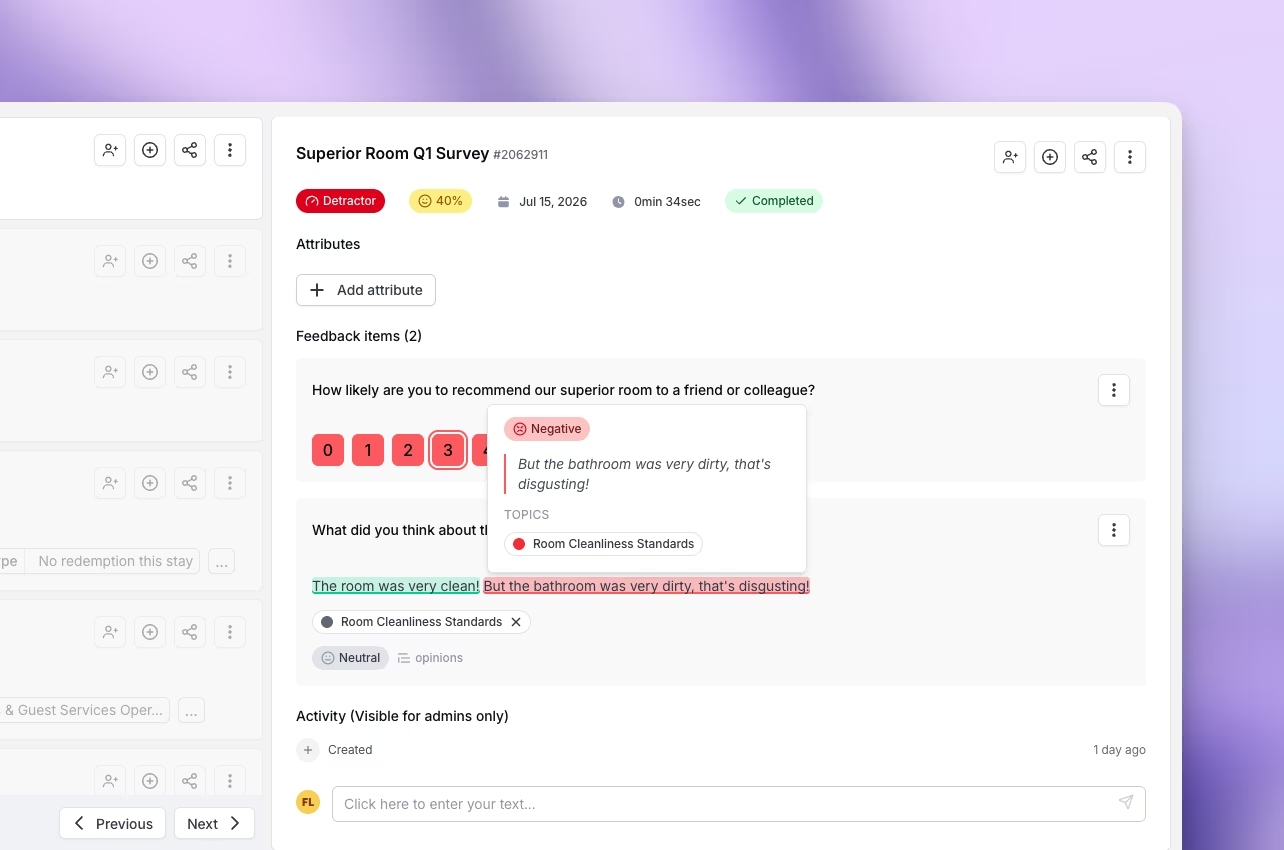
What Feedier does now
Feedier now analyzes sentiment for each opinion within a verbatim, not just the response as a whole. A comment like "Great food but slow service" is correctly split — positive on Food, negative on Service. Each part receives its own sentiment score and its own topic.
Why it matters
Your dashboards and filters now reflect what customers actually feel about each specific dimension of their experience. When you filter or group by topic, only the relevant parts of each response are included — giving you a much more accurate read on where friction and satisfaction actually live.
No more neutral scores that hide opposing realities. No more metrics diluted by unrelated opinions.
Practical Use Cases
- Identify which topics carry negative sentiment even in responses that score neutrally overall
- Compare delivery satisfaction independently from product quality satisfaction
- Build topic-level reports with sentiment scores that aren't diluted by unrelated opinions
- Detect sentiment trends on specific dimensions without analytical noise
This means you can understand each dimension of the customer experience with a level of precision that was simply not possible before.
Turn Your Ask Feedier Sessions Into Reports
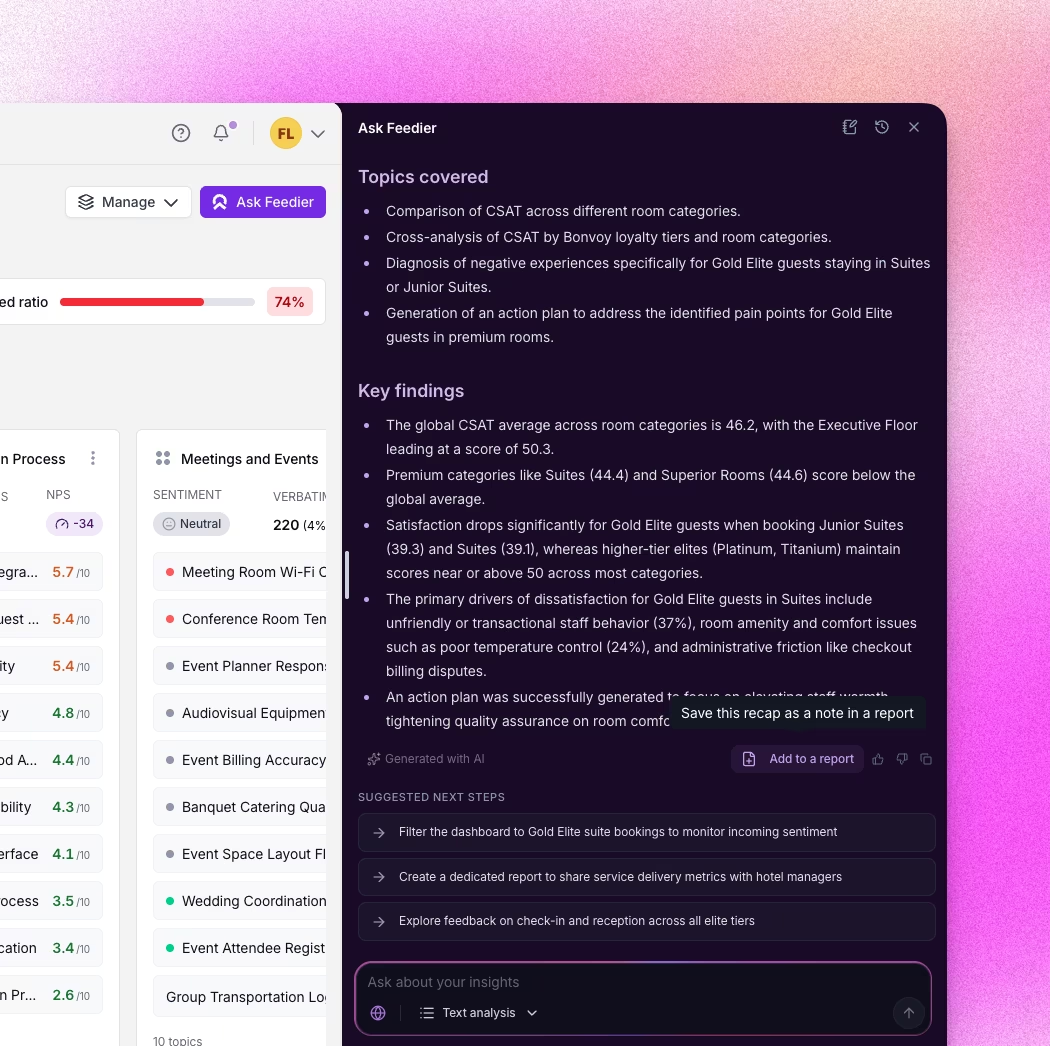
What Feedier does now
Ask Feedier can now summarize your current conversation and add that recap directly into a report — either an existing one or a new one — as a full-page notes component.
Why it matters
Every Ask Feedier session is an investigation. You ask questions, get answers, refine your understanding. Until now, those conclusions stayed in the chat. Now, you can capture and export that thinking directly into a structured report — without copying and pasting, without starting over.
Your analysis sessions become reusable assets, not ephemeral exchanges.
Practical Use Cases
- Summarize a session exploring negative feedback trends before sharing it with your team
- Add Ask Feedier conclusions to an executive report in seconds
- Archive key analysis sessions as structured notes inside your reports
- Build reports incrementally by consolidating insights from multiple conversations
This means your analysis sessions generate report content directly, with no extra effort.
Product Guidance, Right Where You Work
What Feedier does now
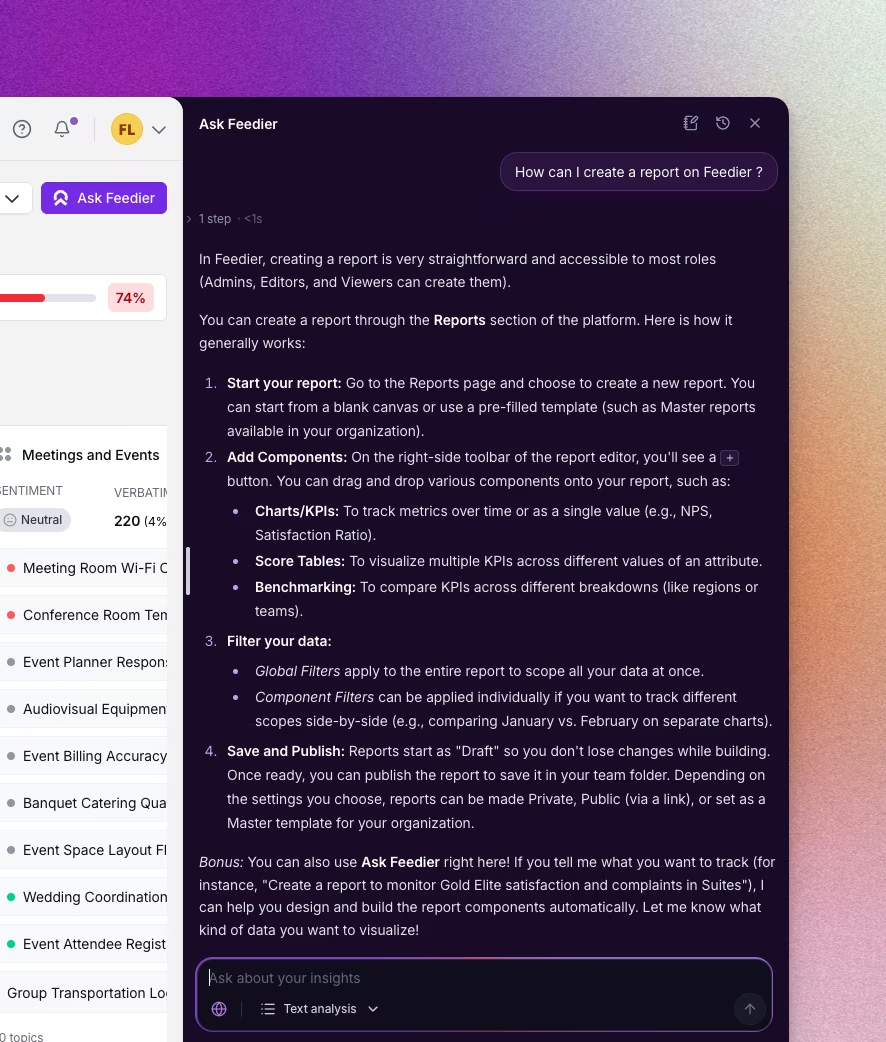
Ask Feedier can now answer how-to questions about using Feedier itself, drawing on the official Help Center documentation and pointing you to the relevant article.
Why it matters
You no longer need to leave your workflow to figure out how something works. Ask a question, get a direct answer with a source. This reduces onboarding friction for new users and removes context-switching for experienced teams working on advanced configurations.
Practical Use Cases
- Ask how to connect Salesforce to Feedier without opening a new tab
- Get explanations on report component settings mid-session
- Help new team members learn faster without redirecting them to external docs
- Access the right documentation by asking a question in plain language
This means you can learn and act inside Feedier without losing your analytical context.
How to Access It
These features are live in your Feedier workspace. Granular sentiment applies automatically to your existing data. For Ask Feedier features, open the Ask Feedier chat from any analysis screen, use Summarize this conversation to export your exchange to a report, or simply ask a question about Feedier.
What This Release Changes for You
Version 4.15.0 strengthens the precision and fluency of your daily work in Feedier. Granular sentiment gives you a clearer picture of what customers actually feel. Conversation summaries let you capture and share insights without friction. Built-in product guidance removes the distance between learning and doing.
The result: more reliable insights, produced faster, shared more easily.
Level 4? You're Level 2
Get the Five Levels of Voice of Customer Maturity

Our articles for further exploration
A selection of resources to inform your CX decisions and share the approaches we develop with our clients.