
Feedier 4.9.0 — Smarter AI Analysis, SWOT Reports & Topic Detection
Version 4.9.0 — May 4th, 2026
This release puts more intelligence into the hands of CX teams. You can now configure your AI analyst once and let it deliver sharper insights across every report and analysis. New tools for topic detection, insight management, and reporting make it easier to surface what matters — and act on it faster.
The Problem
CX teams often work with tools that don't know their business. AI outputs feel generic. Topic tagging is hard to debug. Insights accumulate without any way to curate them. And every new report starts from scratch, even when the structure and brand are always the same.
For teams managing dozens of feedback sources and hundreds of verbatims, the cost of this friction is real: slower reporting, less reliable analysis, and insights that don't quite reflect how your business actually works.
What's New in This Release
Configure your AI analyst once, get relevant outputs everywhere

What it does
Analyst Setup is a new hub in the top navigation that consolidates all org-level configuration into one page: organisation details, business context, language and voice, business KPIs, and branding. Everything you fill in here is automatically injected into AI prompts across the platform.
Why your analysis just got sharper
Every AI output — from text analysis summaries to report narratives — now reflects your company's context, tone, and priorities. The insights Feedier surfaces are immediately relevant to your business, not generic.
Practical use cases
- Set your tone of voice once, and have it applied across all AI-generated outputs
- Define your business KPIs so the AI prioritises the metrics that matter to your team
- Upload brand assets to ensure every exported report matches your visual identity
- Onboard new analysts faster with a pre-configured, consistent analysis environment
This means you can stop adapting generic AI outputs to your context, and start receiving analysis that already speaks your language.
From feedback to strategic clarity in one click

What it does
A new SWOT component is available in the report builder. It generates a four-quadrant Strengths, Weaknesses, Opportunities, and Threats analysis for any topic or segment, with verbatim proof links preserved inside each card. Cards are fully editable, and when sent via Autopilot, the content is freshly regenerated at send time.
Why it changes how you report
Translating customer feedback into a strategic overview used to require hours of manual synthesis. Now you can produce a structured SWOT analysis from your verbatims in seconds, with the evidence already included.
Practical use cases
- Build a SWOT slide for an executive presentation directly from customer feedback
- Identify competitive weaknesses flagged by customers before they become strategic risks
- Spot emerging opportunities in feedback that product teams aren't yet tracking
- Include auto-regenerated SWOT analyses in weekly Autopilot reports to stakeholders
This means you can move from raw feedback to a structured strategic overview in one click, without leaving Feedier.
Keep your analysis clean and focused
What it does
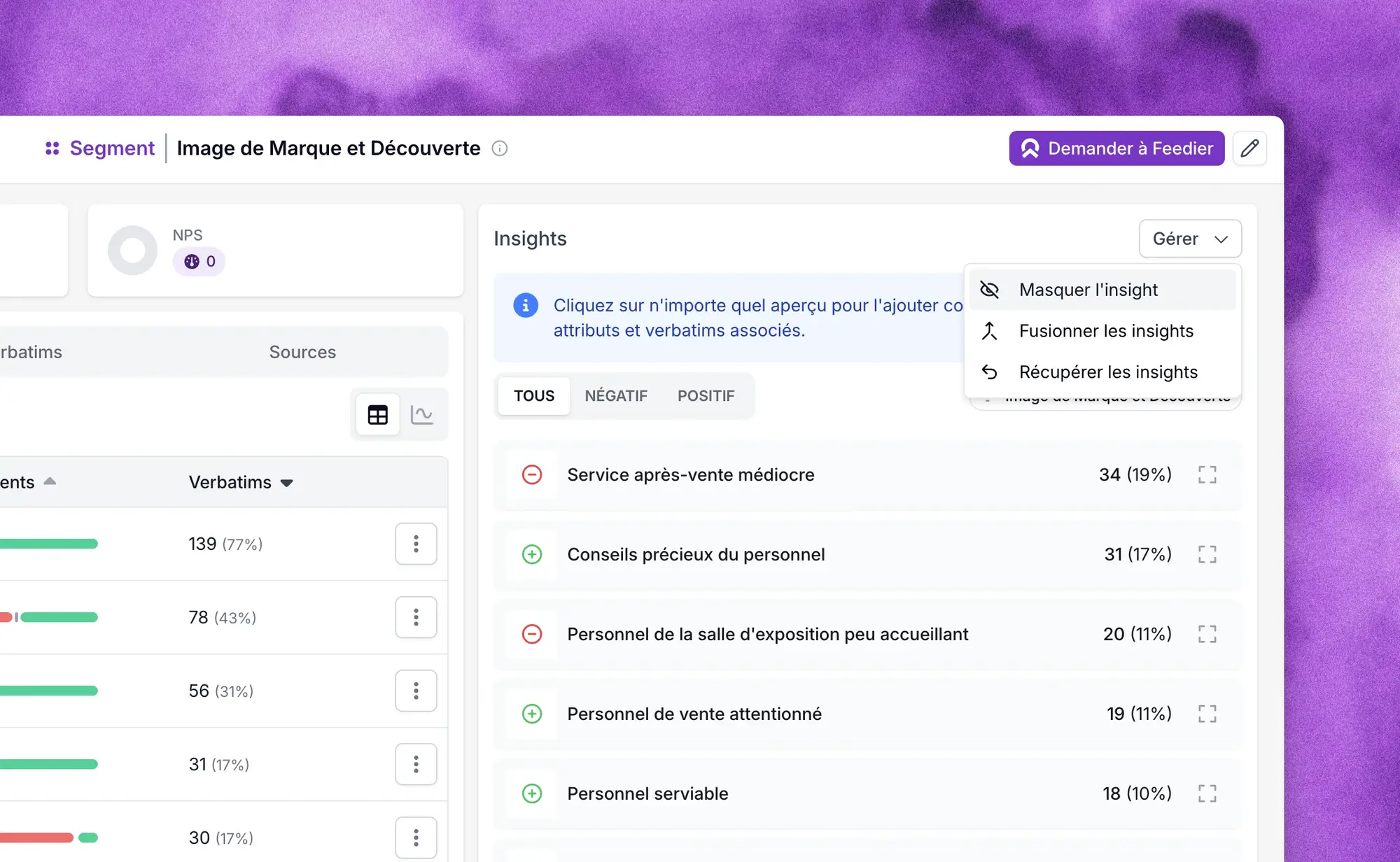
Admins and staff can now hide insights that are wrong, irrelevant, or low-value from the Insights component in Text Analysis or reports. Hidden insights can be restored at any time via a "Manage hidden" option.
Why it matters for your team
Clustered insight lists slow down analysis and reduce the signal-to-noise ratio for your entire team. Hiding and restoring insights gives CX teams control over the quality of their analysis without permanently losing data.
Practical use cases
- Remove off-topic insights that distort your topic analysis
- Reduce noise in reports shared with stakeholders
- Restore hidden insights during quarterly reviews to reassess their relevance
- Maintain a curated, high-signal insight library for decision-making
This means you can maintain a clean, high-quality insight view without losing any data permanently.
Finally understand why topics are or aren't applied
What it does
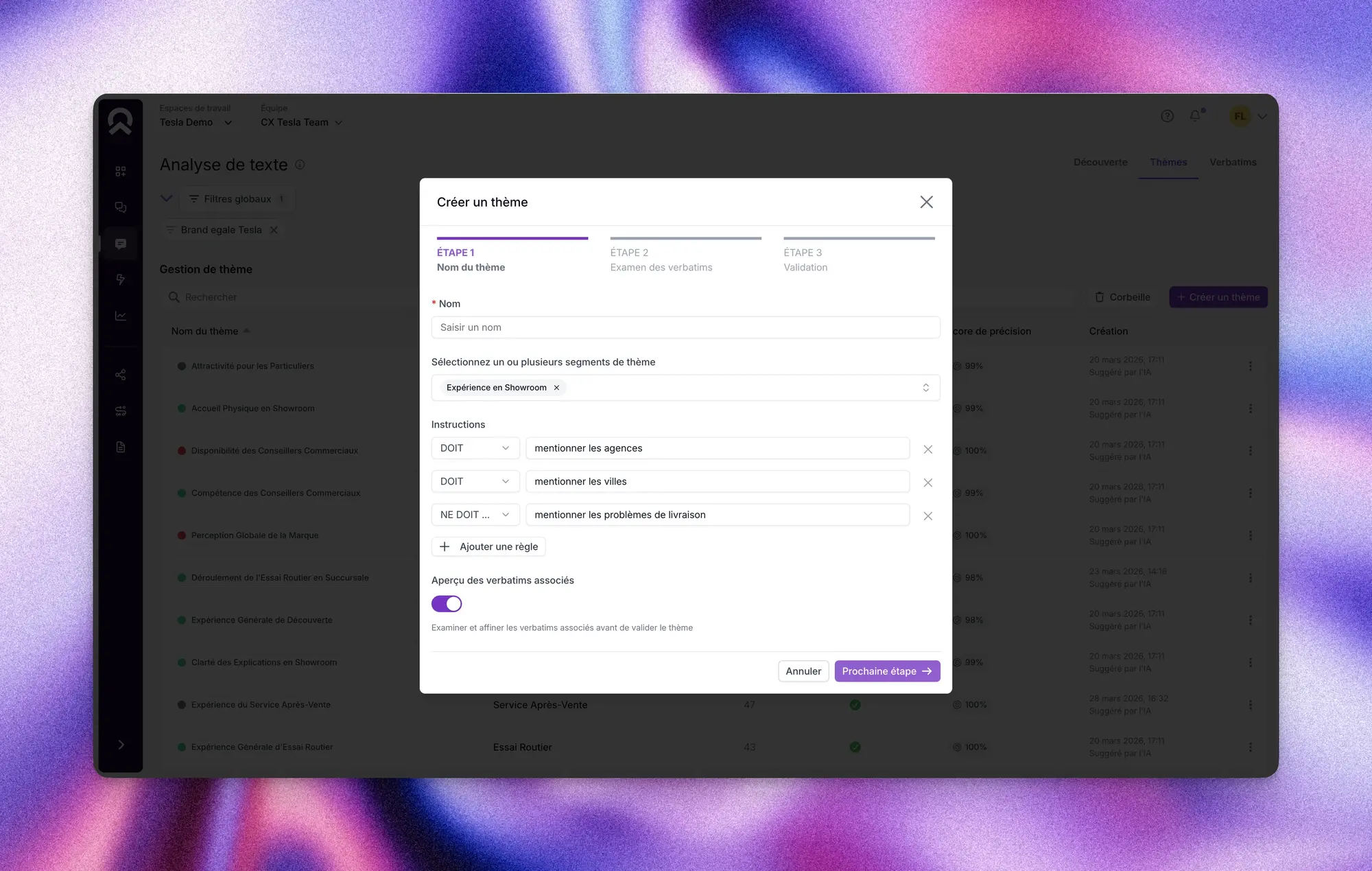
Topic detection now uses structured instructions — must-include and must-exclude lists — instead of a single free-text context. Each instruction is evaluated separately. A new Tagging Analysis modal lets you inspect topic-by-topic verdicts on any verbatim, with the AI's reasoning for each decision. Decisions made under old instructions are flagged as outdated when you update a topic.
Why this changes your text analysis
Topic tagging has historically been hard to trust. Teams couldn't tell why a verbatim was or wasn't tagged. Structured instructions make detection more reliable and transparent. The Tagging Analysis modal shows exactly what the AI decided — and why.
Practical use cases
- Debug topic misclassifications directly from a verbatim, without guessing
- Create sharper must-exclude rules to prevent off-topic verbatims from polluting a topic
- Attach missing topics manually after reviewing rejection reasons
- Build taxonomies with the new wizard that generates instructions from the start
This means you can build more accurate topic taxonomies and diagnose detection issues in minutes, not days.
Send richer feedback with less manual work

What it does
When creating a feedback push link, you can now manually attach attribute values — such as survey scope, contract reference, or technical stop reference — before sending. This extends logic already available on QR code links to push links.
Why context at collection time matters
Feedback without context is hard to act on. Pre-filling attributes ensures every response is tagged with the right information from the moment it's submitted, reducing manual enrichment and improving analysis accuracy downstream.
Practical use cases
- Attach a contract reference to a push campaign before sending to a specific client
- Pre-fill a technical stop reference to accurately segment post-intervention feedback
- Reduce manual attribute tagging in Live Feed after feedback is collected
- Ensure consistent attribute coverage across large push campaigns
This means you can enrich your feedback with context before it's collected, not after.
How to Access It
- Analyst Setup: Top navigation bar. Admins only.
- SWOT Component: Report builder component picker.
- Hide Insights: Insights component → Manage menu → Hide.
- Smarter Topic Detection: Topic creation/edit flow. Tagging Analysis modal accessible from any verbatim.
- Pre-fill Attribute Values: Push/campaign send module.
What This Release Changes for You
Version 4.9.0 is about making Feedier's intelligence more reliable, more transparent, and more aligned with how your team actually works. Your AI analyst now knows your business. Your topics are easier to trust. Your insights are easier to curate. Your feedback arrives with context already attached.
The result is an analysis workflow where less time is spent cleaning data, and more time is spent making decisions.
Try It in Your Workspace
Log in and explore the new features directly. If you want a walkthrough, contact your Feedier team.
Level 4? You're Level 2
Get the Five Levels of Voice of Customer Maturity

Our articles for further exploration
A selection of resources to inform your CX decisions and share the approaches we develop with our clients.