Deeper AI conversations, stronger data privacy, and smarter import diagnostics.

Version 4.7.0 — March 24th, 2026
This release brings your AI analyst closer to the heart of your analysis. You can now ask questions directly inside Deep Research, get answers grounded in your filtered feedback in real time, and move from raw signals to structured insight without switching tools.
For CX teams managing sensitive customer data, this release also introduces new privacy controls and a clearer data governance framework. And when a CSV import fails, you now know exactly why — immediately.
The Problem
CX teams have always faced the same tension: the more feedback you collect, the harder it becomes to extract meaning quickly. Analysts switch between views, copy data manually, and lose context in the process.
At the same time, when feedback contains sensitive customer information, there's often no clear way to control who can see it — or when. And when a CSV import fails, finding the cause means going through columns one by one.
This release addresses all three friction points.
What's New in This Release
Ask your data anything — directly in Deep Research

A smarter way to explore feedback
Open Prompt, Feedier's AI-powered conversational assistant, is now available inside Deep Research. Type any question in natural language and receive a streaming AI response in real time, scoped to your current filters and segment.
Slash commands like /global-summary, /insight-summary, or /create-action-plan trigger specific analyses instantly. Responses include clickable FQL filters, insight badges, and action plan cards. Your conversation history is saved automatically. Open Prompt is also now available in Dashboard.
Why it matters for your team
Before this update, turning a set of filtered verbatims into an insight narrative required navigating multiple views. Now, your analysis stays in one place. You ask a question, get an answer grounded in your actual feedback data, and act immediately.
This removes the friction between exploration and decision-making — and makes your AI analyst feel like a true research partner.
When to use it
- Ask "What are customers saying about onboarding?" and get a structured answer from your verbatims
- Use
/create-action-planto turn a set of insights into a concrete next step - Run a
/global-summaryat the start of a review session to get a fast overview - Filter by a specific segment and query patterns within that population
This means you can move from a filtered view to a grounded insight narrative in seconds, without leaving your analysis.
Full control over sensitive feedback data
Privacy by design, visibility when it matters
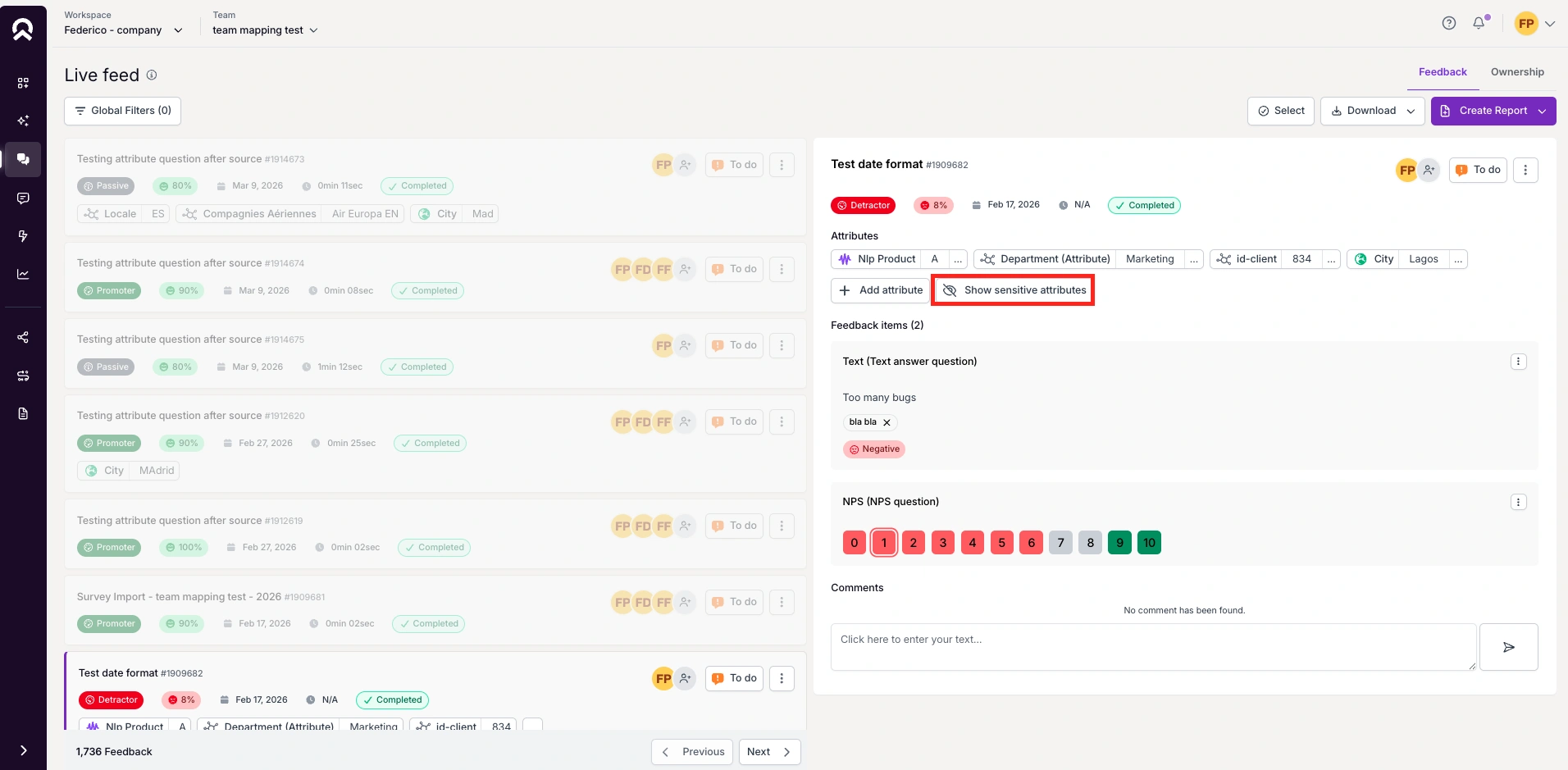
Admins can now reveal hidden and sensitive attributes on feedback items. A "View Hidden Attributes" button appears in the feedback section for authorized users. Accessing them requires explicit confirmation, attributes auto-hide after 60 seconds or on navigation, and every access is logged with user and timestamp — visible to all team admins.
Why it matters for your team
Sensitive customer data needs to be accessible when necessary, but protected by default. This feature gives CX leaders the tools to investigate specific feedback cases without exposing sensitive information permanently — with a full audit trail for compliance and governance.
When to use it
- Investigate a specific complaint case with full customer context
- Verify data accuracy on a sensitive feedback item without broad exposure
- Track who accessed sensitive information and when, for compliance reporting
- Enable escalation workflows that require attribute visibility
This means you can access the full context of a feedback item when you need it, with complete transparency and control over who sees what.
A clearer structure for your text analysis setup
NLP attributes: labeled, controlled, and privacy-compliant
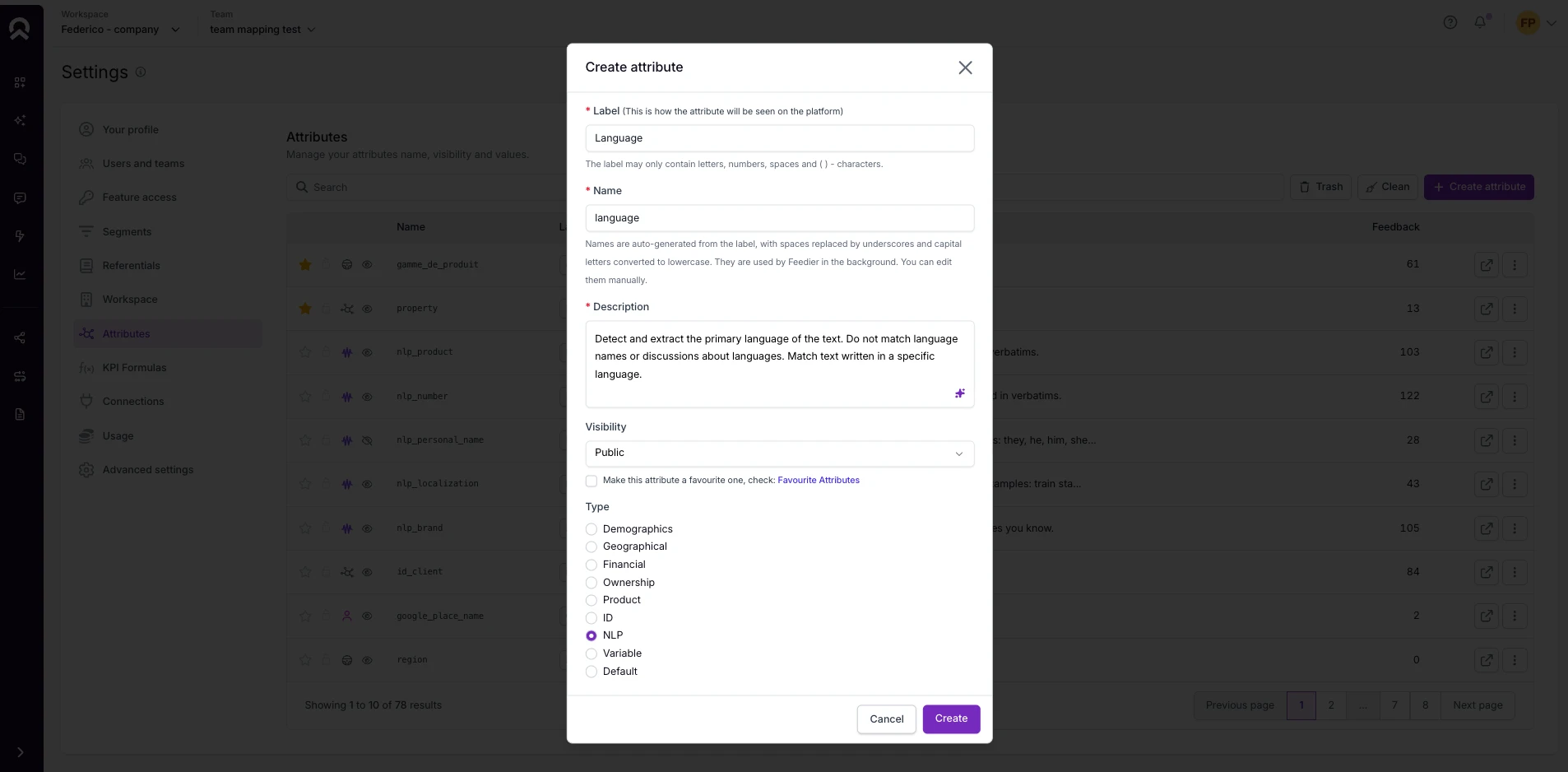
Feedier now clearly distinguishes NLP attributes — used for automatic text extraction — from regular custom attributes. They are labeled in your settings, can be created or converted manually, and can be marked as sensitive, triggering automatic anonymization (displayed as ***) in Live Feed and Text Analysis views.
Why it matters for your team
As AI-driven analysis becomes more central to CX workflows, knowing which attributes are managed by the NLP engine — and which contain sensitive data — is essential. This update gives teams a clear, auditable structure for their text analysis setup.
When to use it
- Identify all NLP-managed attributes in a single view
- Mark customer identifiers as sensitive to prevent accidental exposure in reports
- Create new NLP attributes tailored to your analysis needs
- Remove outdated NLP attributes with confidence — they won't be recreated automatically
This means you can build a text analysis setup that's both powerful and privacy-compliant, with full visibility over how data is processed.
Faster import troubleshooting
No more guessing when a CSV import fails
When a CSV import fails due to a column name issue, the error message now identifies the exact column that caused the problem. No more checking each column manually.
Why it matters for your team
Debugging import errors used to require manual inspection of every column. This change saves time and reduces friction during data setup — especially for teams managing multiple feedback sources.
When to use it
- Fix column name issues in CSV files immediately, without trial and error
- Onboard new data sources faster with clear, actionable error feedback
This means you can resolve import issues in minutes instead of hours.
How to Access It
Open Prompt is available in Deep Research and Dashboard — open the side panel and start typing. Hidden attributes are accessible to admins from any feedback item view via the "View Hidden Attributes" button. NLP attribute settings are in your attribute configuration panel. CSV import error details appear directly in the import error notification.
What This Release Changes for You
Version 4.7.0 makes Feedier a faster, more conversational analysis environment. You can now interrogate your feedback data directly, access sensitive context with control and transparency, and manage your NLP setup with precision.
These changes reduce the time between raw feedback and meaningful action — and give your team a clearer, more governed path to customer understanding.
Try it in your workspace.
Level 4? You're Level 2
Get the Five Levels of Voice of Customer Maturity

Our articles for further exploration
A selection of resources to inform your CX decisions and share the approaches we develop with our clients.