More data sources, cleaner data, smarter analysis, and frictionless security (4.12.0 to 4.14.0)
Versions 4.12.0 to 4.14.0 — June 2026
Three releases, one consistent direction: giving CX teams more control over where their data comes from, how clean it is, and how confidently they can act on it. From connecting Salesforce tickets to asking the web what your competitors score on NPS — Feedier keeps reducing the distance between raw feedback and reliable decision-making.
(English subtitles available)
The friction points this sprint targets
CX teams manage more data sources, more stakeholder expectations, and more analytical complexity than ever. But the tools that are supposed to help often introduce their own friction: data that needs cleaning before you can use it, analysis that requires context you don’t have, and actions whose impact you can’t measure. These three releases address each of those gaps directly.
Version 4.12.0 — June 4th, 2026
Bring Salesforce ticket data into your feedback analysis
What changed
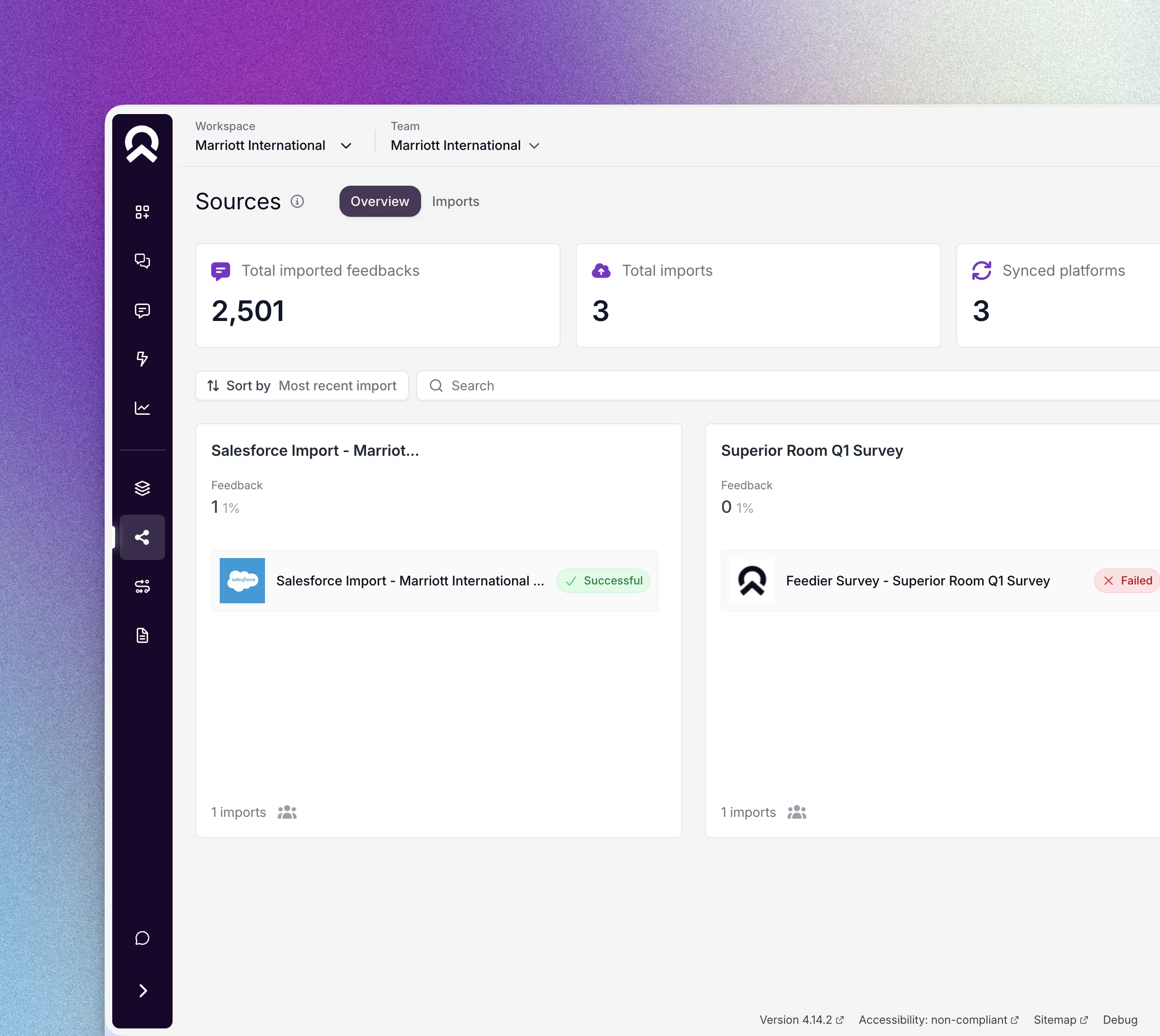
You can now import Salesforce Cases directly into Feedier as a ticketing source. The connection reuses the existing Salesforce OAuth integration — no new permissions, no admin install required. Map standard and custom Case fields to your Feedier attributes or verbatim body, choose whether to import closed cases only or keep open tickets in sync, and let incremental syncs handle the rest without duplicates.
Why it matters
Ticket data contains some of the richest, most actionable customer signals your business generates — but it’s historically lived in a separate silo. When you can’t combine ticket language with survey scores and NPS trends, you miss the patterns that matter most. This integration closes that gap for teams already using Salesforce.
What you can do now
- Analyze ticket language alongside survey verbatims and satisfaction scores
- Segment support feedback by product area, region, or customer tier using Feedier’s attribute framework
- Track whether recurring ticket themes correlate with drops in NPS or CSAT
- Keep open tickets updated on every sync to monitor evolving issues in real time
This means you can build a unified picture of customer experience that includes both solicited feedback and unsolicited support signals.
How to access it: Go to Sources → Add import, find Salesforce (Tickets) in the Ticketing category, and connect using your existing Salesforce OAuth.
Control how your choice values appear — everywhere
What changed
You can now set the exact display order of choice values directly in the feedback template editor. The order you define applies consistently across benchmark components, feedback item views, segments, reports, and exports. New choices that appear after an import are automatically flagged as unordered so you can place them correctly.
Why it matters
When choice values appear in an arbitrary order, reports become harder to read and benchmark comparisons lose their intuitive structure. A Yes/No question that displays as No/Yes creates unnecessary cognitive load for every reader. This change makes your reporting cleaner and your stakeholder presentations more credible.
What you can do now
- Set a logical order for Yes/No, Agree/Disagree, or any custom choice question
- Ensure your most important response categories appear first in benchmark views
- Align export column order with the order your stakeholders expect
- Catch and place new choice values as soon as they appear from an updated survey
This means your reports reflect the structure you intended — not the order data happened to arrive in.
How to access it: Open any feedback template, go to the choice question, and drag-and-drop values into the order you want. Changes apply across all views immediately.
Version 4.13.0 — June 18th, 2026
Clean up your attribute data yourself

What changed
You can now merge duplicate or near-duplicate values within any attribute directly from Settings → Attributes. Select the value to retire, choose the destination value to keep, confirm — and Feedier re-links all associated feedback automatically. Progress is tracked in the Long tasks panel.
Why it matters
Attribute cleanliness is the foundation of reliable customer insights. When the same concept exists under two slightly different labels, every comparison, benchmark, and trend report is distorted. This feature puts data governance back in the hands of the people who understand the business context best: your CX team.
What you can do now
- Merge two spellings of the same store after a naming standardization
- Consolidate regional labels following an organizational restructuring
- Fix owner or manager attributes when team members change roles
- Clean up import errors that created near-duplicate values across multiple sources
This means you can move from fragmented attribute data to a clean, unified dataset — in minutes, without involving engineering.
How to access it: Go to Settings → Attributes, open an attribute with at least two values, click Merge on the value to retire, select the destination, and confirm. Note: the merge is irreversible and available to Admin users only.
Version 4.14.0 — June 25th, 2026
Bring external intelligence into your analysis
What changed
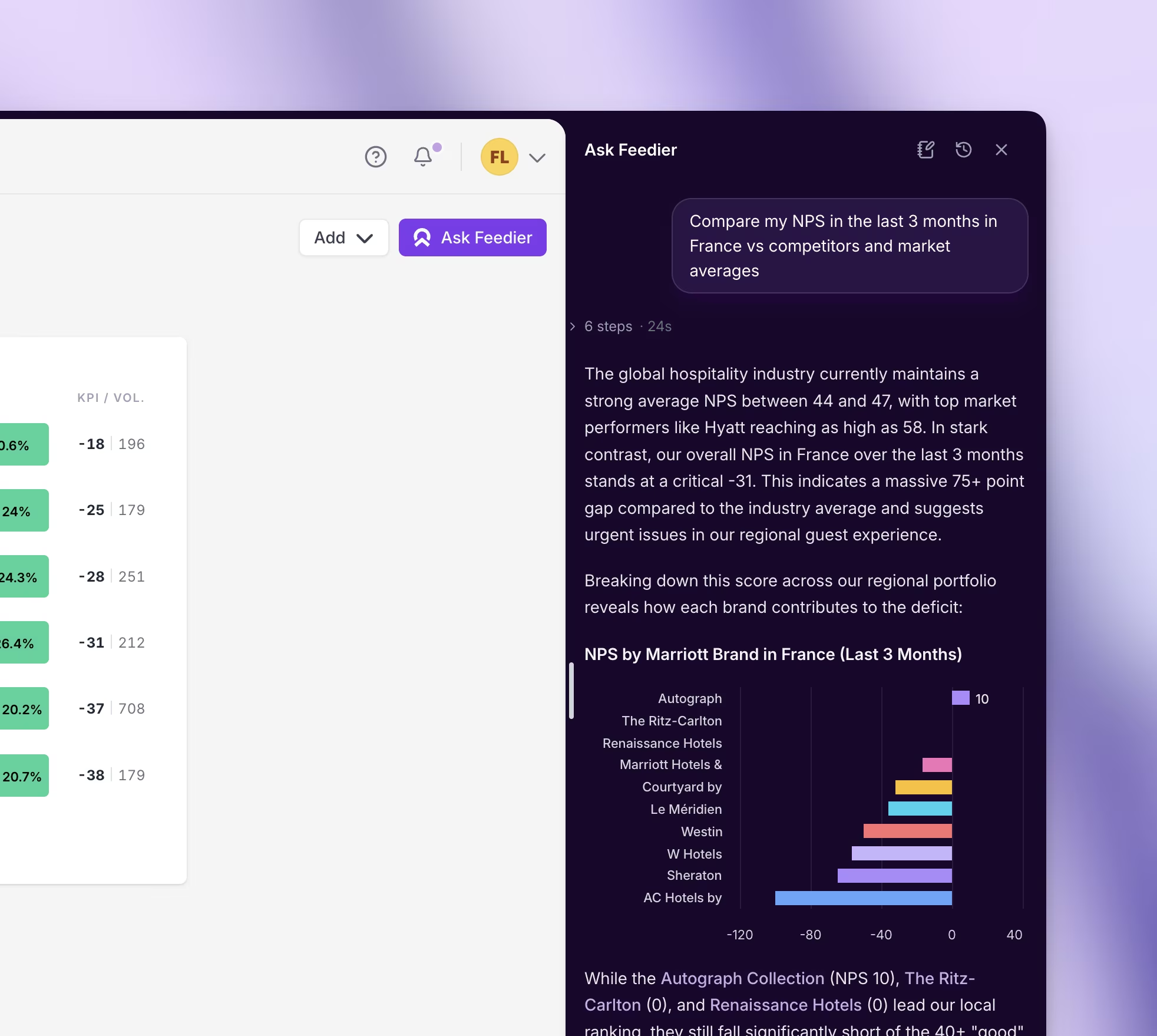
Ask Feedier can now search the web to answer questions that go beyond your internal feedback data. Ask about your competitors’ NPS, market benchmarks, or industry trends — and get answers that combine external signals with your own customer data.
Why it matters
Understanding your performance requires context. CX teams either ignore competitor benchmarks or spend hours searching for them manually. Ask Feedier closes this gap by bringing web intelligence directly into your analysis workflow — no extra tools, no lost context.
What you can do now
- Compare your NPS against key competitors in a single query
- Research how your market talks about specific pain points
- Validate whether a customer concern is unique to your brand or industry-wide
- Enrich your SWOT analysis with real external signals
This means you can move from internal feedback to a full competitive picture without leaving your workspace.
How to access it: Go to Ask Feedier, type a question that needs external context, and fill in your Business context for the most accurate results.
Connect problems to actions — and prove it worked
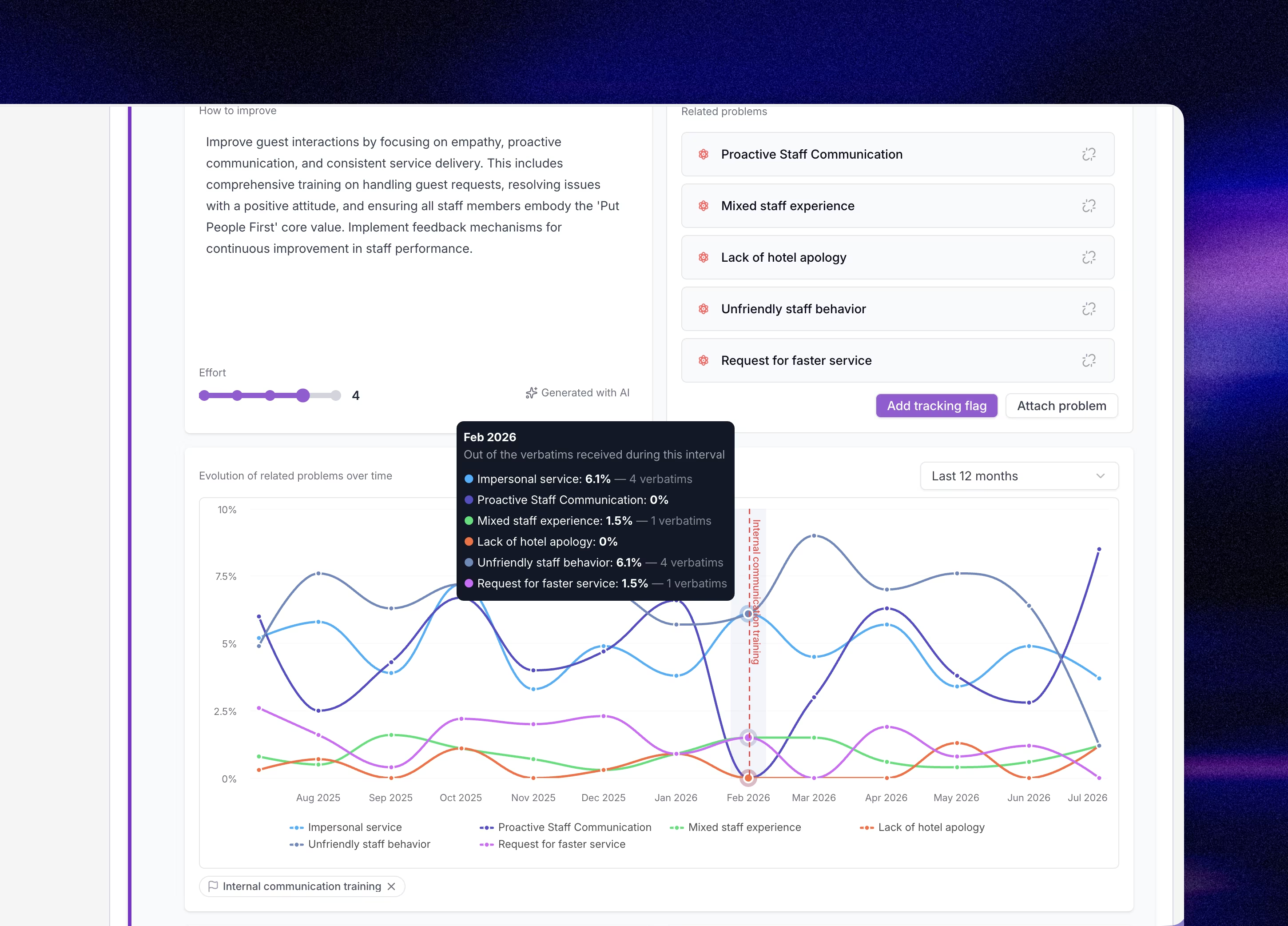
What changed
Each action in Feedier now shows a Related problems card. Attach the insights the action is meant to fix, and add tracking flags to the evolution chart to mark when an action was implemented or changed.
Why it matters
One of the most common frustrations in CX work is not knowing whether an action actually worked. You fix something. You wait. You check the numbers. But did the change cause the improvement? Tracking flags let you answer that question clearly.
What you can do now
- Attach a recurring insight to the action meant to fix it
- Mark the exact date a new process was launched and watch the related problem trend change
- Show stakeholders a timeline of actions and their measurable impact
- Link the same insight to multiple actions to see which approach had the most effect
This means you can finally close the loop between identifying a problem and proving that you solved it.
How to access it: Open any action in your Action Plan, use the Related problems card at the top to attach insights, then click Add tracking on the evolution chart.
Secure access without the daily friction
What changed
Two-factor authentication no longer asks for a code on every login. Once a device is verified, it stays trusted for 7 days. Review and revoke trusted devices anytime from Settings → Advanced.
Why it matters
Security matters, but friction kills adoption. Teams that log in daily shouldn’t have to re-verify every session. This update keeps your workspace secure while removing the interruption that slows teams down.
What you can do now
- Log in from your usual browser without repeated code prompts
- Spot unfamiliar devices in your trusted list and revoke access immediately
- Reset all trusted devices automatically when changing your password
- Maintain security standards without compromising day-to-day usability
This means you can keep your workspace secure without slowing your team down every morning.
How to access it: After your next 2FA verification, your browser is automatically trusted for 7 days. Manage devices in Settings → Advanced.
What These Releases Change for You
Versions 4.12.0 through 4.14.0 expand what Feedier can do and sharpen how reliably it does it. More data sources to analyze. Cleaner attribute data to segment with. External intelligence to benchmark against. A tighter loop between problem identification and action measurement. And a team that starts every day without authentication friction.
Less guesswork. More clarity. Faster decisions.
Try it in your workspace.
Level 4? You're Level 2
Get the Five Levels of Voice of Customer Maturity

Our articles for further exploration
A selection of resources to inform your CX decisions and share the approaches we develop with our clients.